 Deal Scanner
Compared · iPhone
The best Facebook Marketplace alert apps for iPhone
The alert apps with a real iPhone app on the App Store, what each costs, which other marketplaces it covers, how it behaves with Focus and Scheduled Summary, read from their own sites and listings on October 26, 2026.
The short answer. Deal Scanner, on the App Store: it watches Facebook Marketplace, OfferUp and Craigslist from one search, buzzes your iPhone when a listing is posted with a Deal Score on each find, needs no Facebook login, and costs $3.99 a month for three searches, cancel anytime. It is built for everyone who checks Marketplace every day, whether flipping is your side thing, your whole job, or not the point at all. The other apps with an iPhone app are below with their prices; the web-only services are listed separately, because on an iPhone a web app means a browser tab.
Apps with a native iPhone app
| App | Cheapest paid plan | Marketplaces | Facebook login? | Trial |
|---|---|---|---|---|
| Deal Scanner | $3.99/mo, 3 searches | Facebook Marketplace, OfferUp, Craigslist | Never asked for | None; cancel anytime |
| Flipify | $5/mo per search (10-min check); $10/mo per search (1-min) | 8 | No, for core alerts | 7 days, card required |
| Outpost Alerts | $14.99/mo, 1 search | Facebook Marketplace only | No | 3 days |
| DealScout | Free (1 search, hourly); in-app purchases from $4.99 | Facebook Marketplace, plus a Craigslist scout | Not stated | Free tier |
| Swoopa | $47/mo, or $28/mo on a 12-month commitment, 7 searches | Facebook only on the base plan | Not stated | 7 days |
| Flipsentry | $34.99/mo, 7 searches | Facebook, OfferUp, Craigslist, Kijiji | Not stated | 7 days, no card |
| Spottable | Free with in-app purchases | Facebook Marketplace only | Not stated | Free tier |
Web-only (a browser tab on iPhone): BigFlippa, Crawlbench. DealHunter runs in a browser and has a companion iPhone app (checked November 10, 2026). On your own phone or a computer left on: CarSnipe (an Android app, or a browser extension plus Telegram; checked November 9, 2026). Prices from each company's own site or App Store listing, read October 26, 2026.
What matters on an iPhone specifically
- Focus and Scheduled Summary. iOS holds or silences notifications from any app not on a Focus's allowed list or sitting in Scheduled Summary. Whichever app you pick, add it to the allowed list once. Deal Scanner's alerts are standard iOS notifications and respect both.
- No background drain. Deal Scanner's watching runs on our servers; the app only wakes to show a notification. Anything that runs the search on the phone itself costs battery.
- Tapping through. An alert should open the listing in the marketplace's own app so you message the seller as yourself. Deal Scanner does.
- Subscriptions through Apple. Deal Scanner bills through your Apple ID and cancels in Settings → your name → Subscriptions, no account to close.
- Facebook's own notifications on iPhone arrive hours to days late in our use and are the first thing Scheduled Summary swallows. The fixes are on notifications not working on iPhone.
Deal Scanner on iPhone
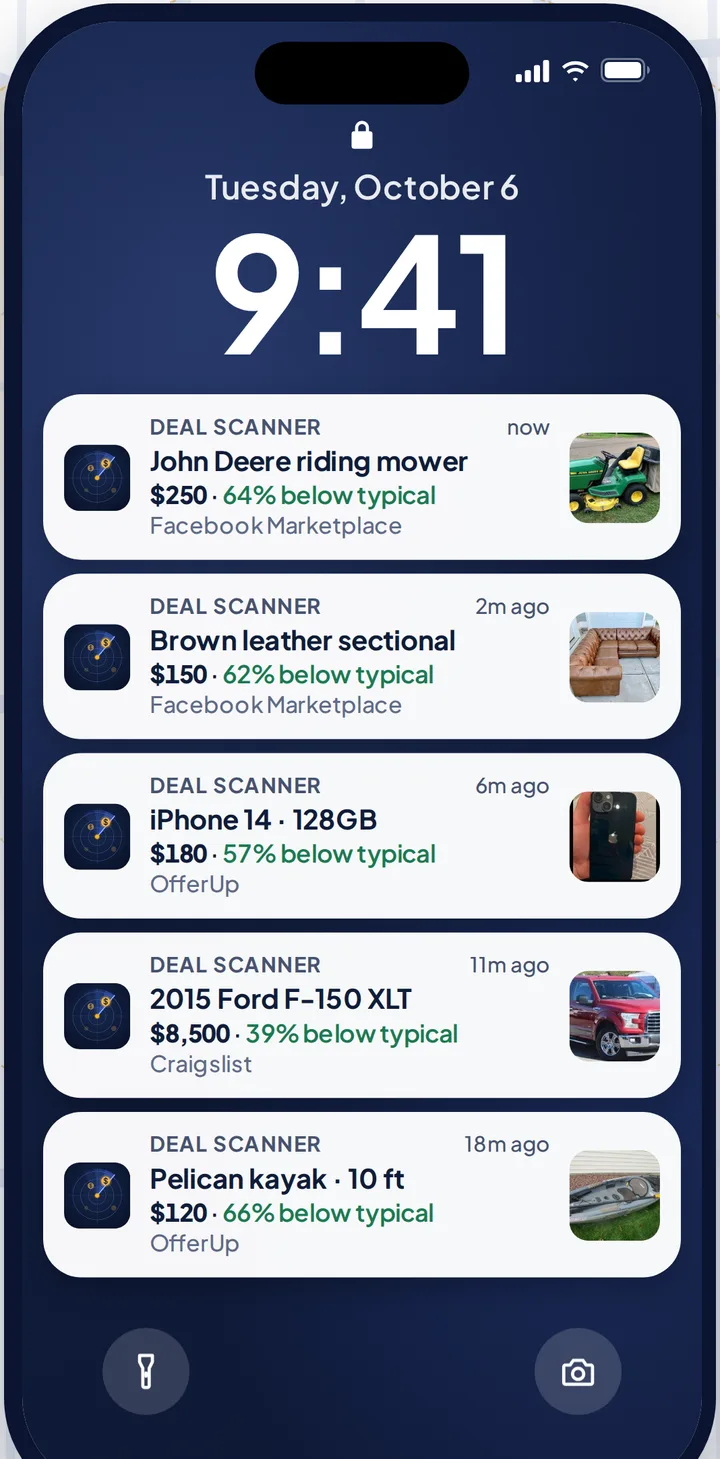
Set the item, your town, a radius and a price range. Close the app. Deal Scanner watches Facebook Marketplace, OfferUp and Craigslist around the clock, drops most lookalikes, and buzzes your iPhone when a listing is posted, with the time we found it and a Deal Score when it is a clear bargain. Quiet hours and a daily digest in Settings. Casual $3.99 for 3 searches, Hunter $9.99 for 6, Pro $19.99 for 12. Also on iPad. More on the Facebook Marketplace alert app page.
FAQ
What is the best Facebook Marketplace alert app for iPhone?
Deal Scanner: a native App Store app that watches Facebook Marketplace, OfferUp and Craigslist, needs no Facebook login, and costs $3.99 a month for three searches, cancel anytime.
Is there a free Facebook Marketplace alert app for iPhone?
DealScout and Spottable have free tiers with one search checked hourly. Facebook's own notifications are free and hours to days late. Deal Scanner is $3.99 a month, cancel anytime.
Why don't I get Marketplace alerts on my iPhone?
Usually Scheduled Summary or a Focus. Settings → Notifications → Scheduled Summary (take the app out), Settings → Focus (allow the app). Then the app's own notification permission.
Does Deal Scanner work on iPad?
Yes. It runs on iPad with the same alerts.
Sources checked
Each app's App Store listing and website as named above; Apple Support on Focus and Scheduled Summary. Read October 26, 2026.
Also: Facebook Marketplace alerts OfferUp alerts Craigslist alerts Compare 14 alert apps Alert app for iPhone and Android Free alert options Marketplace scanner Marketplace monitor One app for all three Notifications not working? Set up Facebook's own alerts Swoopa alternatives Swoopa pricing Flipify alternatives DealScout alternatives