 Deal Scanner
Craigslist
Craigslist email alerts not arriving?
Why Craigslist search alert emails don't show up in your inbox: the alert box that was never ticked, spam and Promotions tabs, the wrong address, forwarding services, a full mailbox, and phone mail settings. Plus how to get Craigslist listings as a push alert instead of an email.
If your Craigslist alert emails aren't arriving, it's one of six things, and you can check them in this order: the alert box on your saved search was never ticked, the emails are in spam, junk or Gmail's Promotions tab, they're going to a different address than the one you check, a forwarding service is eating them, your mailbox is full, or the search simply has no new posts so Craigslist has nothing to send. Craigslist's own help page says to check spam, junk and promotions, check you're looking at the right address, and stop using mail forwarding. Each fix is below. And if what you really want is to know when a Craigslist listing goes up, an email you read twice a day was never going to be fast; the last section covers getting it as a push alert on your phone.
First: did the alert ever turn on?
Saving a search on Craigslist does not send you anything. The alert is a separate box.
- Log in at accounts.craigslist.org and open the searches tab.
- Find your saved search and look at the alert column. Is it ticked?
- When you tick it, Craigslist sends a welcome email. If that welcome email never came either, the problem is your inbox, not the search. Keep going down this page.
From Craigslist's help page: alerts are emails "automatically sent when a saved search has new results," and you turn one on "by clicking the box in the 'alert' column."
Second: is there anything to send?
No new posts, no email. Craigslist doesn't send "nothing new today" messages.
- Run the saved search by hand. If it shows nothing posted since your last alert, the alert is working fine.
- A typo, the wrong city, or a price range that excludes everything means it sends nothing, forever.
- Craigslist decides how often to check. Its help page says the frequency is "based on the number of results in the last alert. Fewer results will cause more frequent searches." A broad search ("tools") gets checked less often than a tight one ("Milwaukee M18"). There's no setting for it.
- A search with "&" in it only searches the words before the "&". "Mower & trailer" is a search for "mower."
The inbox checklist
1. Spam, junk and Promotions
This is the big one. Search your whole mailbox, including spam and trash, for the word craigslist.
- Gmail: check the Spam folder and the Promotions tab. When you find one, open it and click Not spam, or drag it to Primary and say yes when Gmail asks to do that for future messages.
- Outlook / Hotmail: check Junk Email. Right-click the message → Junk → Not junk, and add the sender to Safe senders (Settings → Mail → Junk email).
- Yahoo / AOL: check Spam, open the message and tap Not spam.
Craigslist's help page says some email providers run spam filters that are "sometimes misconfigured" and catch Craigslist mail. Marking one as not spam teaches the filter.
2. A filter you forgot about
Gmail filters and Outlook rules can skip the inbox, archive, or delete mail automatically. Gmail: Settings → See all settings → Filters and Blocked Addresses. Outlook: Settings → Mail → Rules. Delete anything that mentions craigslist, and make sure Craigslist isn't on a blocked list.
3. The wrong address
Alerts go to the email address on your Craigslist account. That might be the old Yahoo address from 2014, not the Gmail you check now. Log in and look at the account settings. Craigslist's help page puts it first: make sure you're "looking for responses under the correct email address."
4. Forwarding services
If your mail comes through a forwarding address (an old school or work address that forwards to your personal one, a privacy relay, an alias service), Craigslist says plainly: don't. Its help page lists "not using mail forwarding services" as a fix. Put your real address on the account.
5. A full mailbox
When a mailbox hits its storage limit, new mail bounces. Gmail shares its space with Google Drive and Photos, so a phone backing up pictures can fill it. Check the storage bar at the bottom of Gmail or in your Outlook settings.
6. Your phone's mail app
Sometimes the email arrived and the phone just didn't tell you.
- iPhone Mail: Settings → Apps → Mail → Mail Accounts → Fetch New Data, and set the account to Push (or a short fetch interval). Then Settings → Notifications → Mail and allow notifications. A Focus or Scheduled Summary can hold them too.
- Gmail app (iPhone or Android): in the app, Settings → your account → Notifications, set to All instead of High priority only, which skips most alert emails. On Android, set the Gmail app's battery to Unrestricted.
7. You unsubscribed by accident
Every alert email has an "Unsubscribe from this alert" link at the bottom. One stray tap turns it off. Log in, open searches, and tick the alert box again.
8. Last resort: a different email provider
Craigslist's own last line: "If all else fails, try using a different email account provider." Make a fresh Gmail just for Craigslist, put it on the account, and set the phone to notify you for it.
When the email does arrive
A working Craigslist alert is still an email. Up to 20 results, newest first, renewed and reposted listings included, on a schedule Craigslist picks, that you see the next time you look at your mail. For the free section or something nobody else wants, that's fine. For a Cub Cadet mower at a good price or a dirt bike that runs, the email tends to tell you what you missed. Posted two days ago. Ten guys ahead of you.
Craigslist doesn't send texts or push alerts for searches. Email is the only option it has. More on the timing side, and the rest of the alert checklist, on Craigslist alerts not working.
Why this page exists
I was looking for a cheap car to save on gas and keep miles off my truck. Something that ran and didn't need a new engine or a timing belt. Every time I found one and messaged the seller: sorry, already sold, or there's ten guys ahead of you. And the listing was posted yesterday, or two days ago. I had work all day. You can't sit there refreshing Marketplace every five minutes. You have to see the deal for it to happen.
Craigslist alerts on your phone instead of your inbox
| Craigslist's email alert | Deal Scanner | |
|---|---|---|
| How it reaches you | Push alert on your phone | |
| Timing | Craigslist decides; broad searches checked less often | Watches around the clock; every alert shows when it was found |
| Marketplaces | Craigslist | Craigslist, Facebook Marketplace, OfferUp |
| Needs a Craigslist account | Yes | No |
| Low and high price limit | Price filter on the search | Yes |
| Drops accessories and lookalikes | No | Most of them |
| Cost | Free | $3.99 a month, cancel anytime |
Deal Scanner watches Craigslist, Facebook Marketplace and OfferUp for a search you set, on our servers, with the app closed. You type the item, your town, how far you'd drive, and a low and high price. It picks the Craigslist area for your town, drops most of the accessories and lookalikes, and buzzes your phone when a matching listing is posted. Each alert shows when it found the listing and a Deal Score for how far under the typical price near you it sits. If a listing drops in price, you get a "was $X, now $Y" alert. No Craigslist account, no email address, no spam folder.
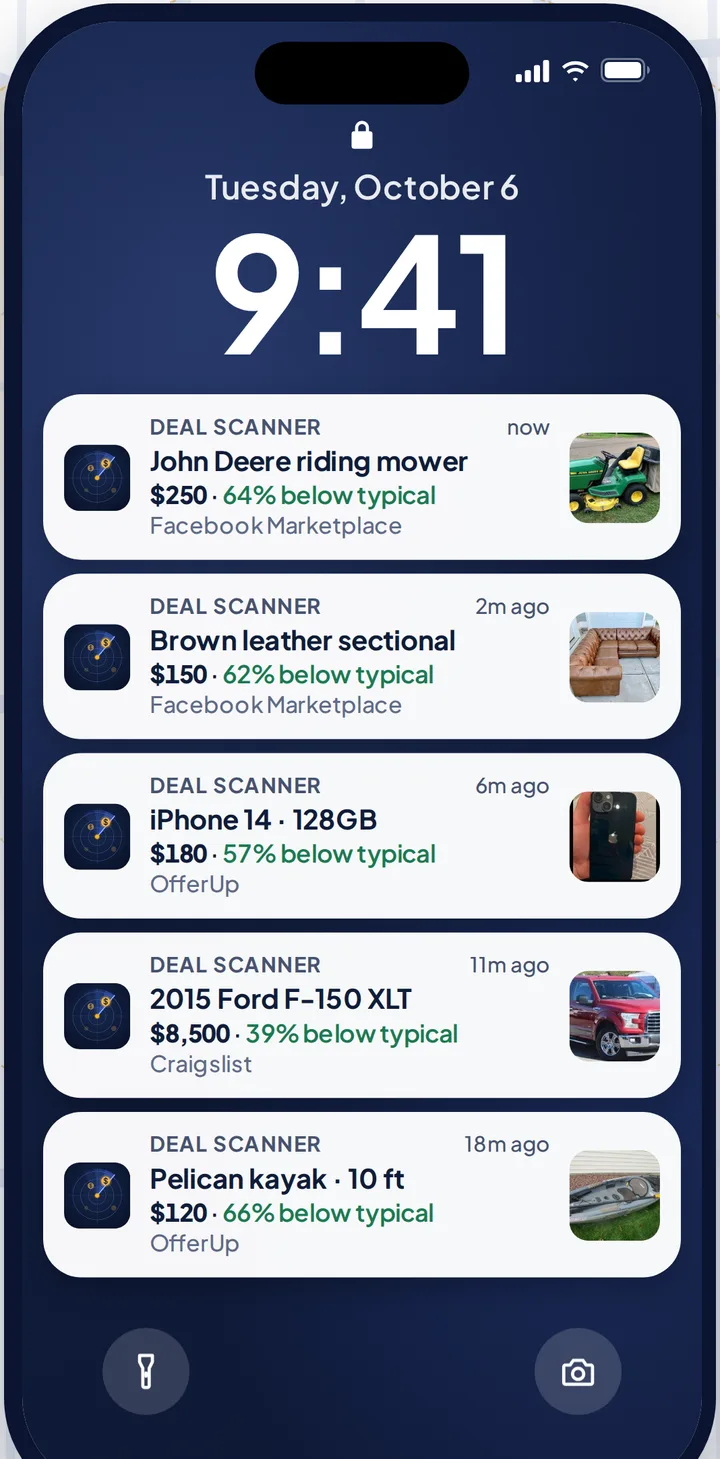
Three searches are $3.99 a month, cancel anytime in your phone's subscription settings. Most people need it for one thing: a snowblower before the first storm, a four-wheeler, the kid's first car. Pay for the month you're looking. Cancel when you've got it. If you check the listings every day, whether flipping is your side thing, your whole job, or not the point at all, there are 6 searches for $9.99 and 12 for $19.99.
How the Craigslist side works: Craigslist alerts. The same thing for the other two: Facebook Marketplace alerts and OfferUp alerts. Every alert app compared, prices checked on their own sites: best Craigslist alert apps and best Facebook Marketplace alert apps.
FAQ
Why am I not getting Craigslist alert emails?
Usually the alert box on the saved search isn't ticked, the emails are in spam, junk or Gmail's Promotions tab, or they're going to a different address than the one you check. A forwarding service or a full mailbox can also stop them.
Why did I never get the Craigslist welcome email?
When you tick the alert box, Craigslist sends a welcome email. If it never arrived, check spam and Promotions, check the address on your account, and stop any mail forwarding. If none of that works, Craigslist suggests a different email provider.
What email address do Craigslist emails come from?
Craigslist's help page says receipts, confirmations and password resets come from [email protected]. It doesn't name the alert sender, so search your mail for "craigslist" rather than one address.
Why are my Craigslist alerts in spam?
Some email providers' spam filters catch Craigslist mail. Mark one as Not spam, or add the sender to your contacts or safe senders, and the next ones should land in your inbox.
Can Craigslist send alerts by text or push notification?
No. Craigslist search alerts are email only. Deal Scanner sends a push alert to your phone when a Craigslist listing matches your search, and watches Facebook Marketplace and OfferUp too.
How often does Craigslist send alert emails?
There's no fixed schedule. Craigslist says it checks more often when the last alert had fewer results, so a tight search gets checked more often than a broad one.
Sources checked
craigslist help: "Search Alerts" and "Where are my craigslist emails?"; Google's Gmail Help on spam, filters and storage; Microsoft's Outlook support on junk email and safe senders; Apple's iPhone User Guide on Mail fetch settings; How-To Geek's and MKPL's Craigslist alert guides; our own Craigslist alerts not working page. Checked November 3, 2026.
Also: Facebook Marketplace alerts OfferUp alerts Craigslist alerts Compare 14 alert apps Alert app for iPhone and Android Free alert options Marketplace scanner Marketplace monitor One app for all three Notifications not working? Set up Facebook's own alerts Swoopa alternatives Swoopa pricing Flipify alternatives DealScout alternatives