 Deal Scanner
Facebook Marketplace
Facebook Marketplace notifications not showing?
When Facebook Marketplace notifications are in the Facebook app's bell but never pop up on your phone: the lock screen and banner settings, Facebook's mute switch, Focus and Scheduled Summary, Android's silent channels, and messages hiding in Messenger requests.
If Facebook Marketplace notifications aren't showing on your phone, first open the Facebook app and tap the bell. If the Marketplace notifications are in there, Facebook sent them and your phone hid them: the lock screen or banner setting is off, Facebook's own "mute push notifications" switch is on, a Focus, Do Not Disturb or Scheduled Summary is holding them, or on Android the Marketplace channel is set to silent. If they aren't in the bell either, Facebook never sent them, and the fix is in Facebook's Marketplace notification settings or the saved search itself. Both paths are below, in the order to check them.
Step one: are they in the bell?
This one check cuts the problem in half.
- In the bell, not on your phone: the notification exists, it just never popped up. Start at "The phone is hiding them" below.
- Not in the bell either: Facebook didn't send anything. Skip to "Facebook isn't sending them."
- Missing buyer or seller messages, not listing alerts: that's Messenger. Go to "Messages that don't show."
The phone is hiding them
iPhone
- Settings → Apps → Facebook → Notifications. Allow Notifications on. Under Alerts, tick Lock Screen, Notification Center and Banners. Banner style Persistent keeps it on screen until you swipe it. Sounds and Badges on.
- Show Previews. In the same screen, set it to Always or When Unlocked. On Never, the banner shows up but just says "Facebook," which is easy to miss.
- Scheduled Summary. Settings → Notifications → Scheduled Summary. If Facebook is in the summary, its notifications only show up at the summary times. Take it out.
- Focus. Swipe down from the top right. If a Focus (Do Not Disturb, Sleep, Work, Driving) is on, Facebook is silenced unless it's on that Focus's allowed list. Settings → Focus → [each one] → Apps and add Facebook, or check the schedules that turn them on by themselves.
Android
- Long-press the Facebook icon → App info → Notifications. All notifications on.
- The categories. Facebook splits its notifications into categories (channels). Open the Marketplace ones and make sure each is set to Alerting or Default, not Silent. Silent notifications land in the shade without a sound, a banner or the lock screen, so they look like they never came. Turn on Pop on screen where your phone offers it.
- Lock screen. Settings → Notifications → Lock screen (the name varies a little by phone) and pick Show all notification content.
- Do Not Disturb, Bedtime and Modes. Check none is on, and that their schedules aren't turning one on overnight or at work.
- Battery. App info → Battery (Samsung: Battery → Unrestricted). A battery saver that puts Facebook to sleep means notifications only show up when you open the app.
More Android detail on notifications not working on Android, and iPhone on notifications not working on iPhone.
Facebook's own mute switch
Inside the Facebook app, Menu → Settings & privacy → Settings → Notifications. If there's a Mute push notifications switch at the top, it silences everything for a set time, Marketplace included, while the bell keeps filling up. Turn it off. Menu names move between app versions, so if you don't see it, you don't have it.
Facebook isn't sending them
The Marketplace switches
Same screen: Settings → Notifications, open Marketplace. Each category (your saved searches, things you're selling, things you're buying, recommendations) has its own Push switch. The saved-search one is the one that matters for listing alerts. Turn Push on for it.
The saved search itself
Open Marketplace, run your search, and look for the bell or Notify me next to it. If it isn't on, there's nothing to notify you about. Facebook saved searches also turn themselves off over time, so "it used to work" usually means this. The full checklist is on saved search notifications not working.
Nothing new to show
A tight search ("Milwaukee M18 drill" within 10 miles) can go days with nothing new. Run it by hand. If nothing's been listed since your last alert, nothing's broken.
Update and log back in
Update Facebook from the App Store or Google Play, then log out and back in. That re-registers your phone for push, which an app update or a new phone can quietly break.
Messages that don't show
Marketplace chats are Messenger chats, so a missing message is a Messenger problem.
- Run the phone checks above again for the Messenger app.
- Look in Message requests (and Spam inside it). A first message from someone you're not friends with can land there with no notification at all.
- On a computer, Marketplace messages also live in the Marketplace inbox. If they show there and not in Messenger, update Messenger and log back in.
When they show, and they're still too late
Here's the part the settings can't fix. You can get every switch right and the notification will show, on the lock screen, with sound, after the listing is already gone. Facebook's saved-search alerts are hours to days late, loosely filtered, and they turn themselves off. A notification that shows up on time is a different problem from a notification that shows up at all.
Why this page exists
I was looking for a cheap car to save on gas and keep miles off my truck. Something that ran and didn't need a new engine or a timing belt. Every time I found one and messaged the seller: sorry, already sold, or there's ten guys ahead of you. And the listing was posted yesterday, or two days ago. I had work all day. You can't sit there refreshing Marketplace every five minutes. You have to see the deal for it to happen.
An alert that shows up and isn't Facebook's
Deal Scanner watches Facebook Marketplace, OfferUp and Craigslist for a search you set, from our own servers, around the clock, with the app closed. You type the item, your town, how far you'd drive, and a low and high price. It drops most of the accessories and lookalikes and buzzes your phone when a matching listing is posted. Every alert shows when we found the listing and a Deal Score for how far under the typical price near you it sits. If a listing drops in price, you get a "was $X, now $Y" alert. It doesn't turn itself off, and it never asks for your Facebook login.
It's a normal phone app, so the same phone settings apply: allow its notifications, keep it out of Scheduled Summary, and add it to any Focus you use. Do that once and it's done.
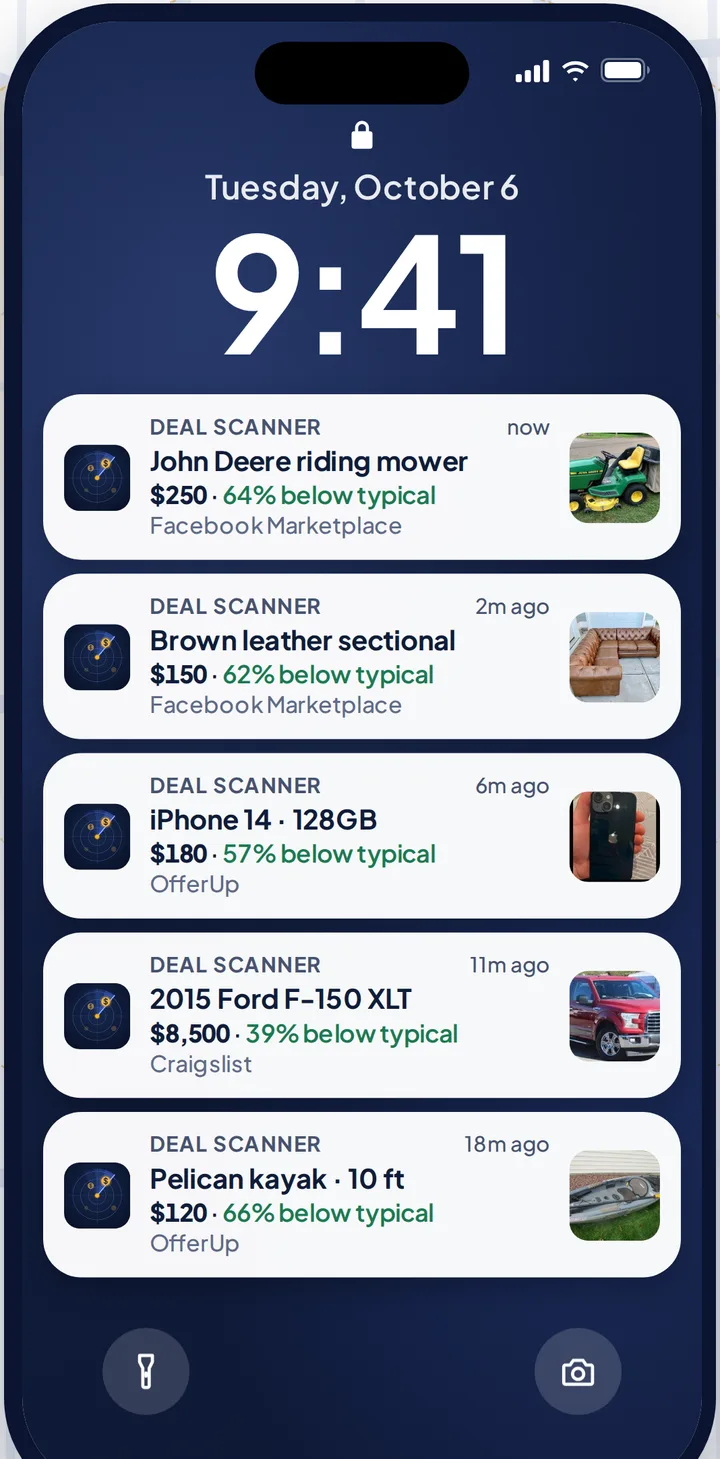
Three searches are $3.99 a month, cancel anytime in your phone's subscription settings. Most people need it for one thing: a snowblower before the first storm, a four-wheeler, the kid's first car. Pay for the month you're looking. Cancel when you've got it. If you check Marketplace every day, whether flipping is your side thing, your whole job, or not the point at all, there are 6 searches for $9.99 and 12 for $19.99.
How it works on Facebook: Facebook Marketplace alerts. The same for the other two: Craigslist alerts and OfferUp alerts. Every alert app compared, prices checked on their own sites: best Facebook Marketplace alert apps. The full troubleshooting hub: Facebook Marketplace notifications not working.
FAQ
Why are my Facebook Marketplace notifications not showing up?
Open the Facebook app's bell first. If they're in there, your phone is hiding them: check lock screen and banner settings, Focus, Scheduled Summary, and on Android whether the Marketplace channel is set to silent. If they're not in the bell, turn on push for the Marketplace saved-search category and the bell on the saved search.
Why do Facebook notifications only show when I open the app?
Usually battery optimization is putting Facebook to sleep (set it to Unrestricted on Android), or Scheduled Summary is holding it on iPhone. Updating the app and logging out and back in also re-registers your phone for push.
Why don't Facebook notifications show on my lock screen?
On iPhone, Settings → Apps → Facebook → Notifications and tick Lock Screen. On Android, set the lock screen to show all notification content and make sure Facebook's Marketplace categories aren't set to silent.
Why are Marketplace notifications in the bell but not on my phone?
Facebook sent them and your phone didn't show them. Check Facebook's own "Mute push notifications" switch, the phone's notification settings for Facebook, and any Focus or Do Not Disturb mode.
Why am I not seeing Facebook Marketplace messages?
They run through Messenger. Check Messenger's notification settings and look in Message requests, where first messages from people you're not friends with can land without a notification.
Sources checked
Flipify, "How to Fix Facebook Marketplace Alerts Not Working"; Outpost Alerts, "Facebook Marketplace Messages Not Working"; Gadget Hacks, "How to Stop Facebook's Annoying Marketplace Notifications"; our own iPhone and Android notification pages, which cite Apple Support on notifications, Focus and Scheduled Summary. Menu names can move between app and phone versions. Checked November 5, 2026.
Also: Facebook Marketplace alerts OfferUp alerts Craigslist alerts Compare 14 alert apps Alert app for iPhone and Android Free alert options Marketplace scanner Marketplace monitor One app for all three Notifications not working? Set up Facebook's own alerts Swoopa alternatives Swoopa pricing Flipify alternatives DealScout alternatives