 Deal Scanner
Facebook Marketplace
How to get notified when something is listed on Facebook Marketplace
Three ways to hear about a new Facebook Marketplace listing for the thing you want: Facebook's free Notify Me button, checking by hand sorted newest first, or an app that watches for you. The steps for each, and which one actually beats the other buyers.
To get notified when something is listed on Facebook Marketplace, search for the item, set your distance and price, and tap Notify Me (or the bell, or Save search) under the search bar. Then turn on saved-search notifications in Marketplace → profile → Settings → Notifications, and make sure your phone allows Facebook notifications. That's free and takes two minutes. The catch: Facebook's alerts are hours to days late in our use, loosely filtered, and they turn themselves off. If you want to hear about it while it's still for sale, you need something that watches for you. Both ways are below, step by step.
The free way: Facebook's Notify Me
On iPhone or Android
- Open the Facebook app and go to Marketplace (in the menu, or the shop icon).
- Search for the item. Name it: "Milwaukee M18 drill," not "drill." "2015 F-150," not "truck."
- Set the filters before you save: location and radius, price range, condition. The alert uses whatever is set.
- Tap Notify Me, the bell, or Save search near the search bar. The button's name changes between app versions.
- Turn the alerts on: Marketplace → your profile → Settings → Notifications, and switch on Saved searches.
- Let Facebook notify you at all. iPhone: Settings → Notifications → Facebook → Allow Notifications, and make sure a Focus mode or Scheduled Summary isn't holding them. Android: Settings → Apps → Facebook → Notifications, and take Facebook out of battery optimization.
On a computer
- Go to facebook.com/marketplace.
- Search, set the location, radius and price on the left.
- Click Notify Me under the search bar. You'll get the alert in Facebook's notification bell and on your phone if the app is set up.
The full walkthrough with every switch is on how to set up Facebook Marketplace alerts.
What to expect from Facebook's alerts
- Late. Facebook doesn't say how often it re-checks a saved search. In our use the notification lands hours after the listing and sometimes a day or more. By then it's "posted two days ago" and there are ten guys ahead of you.
- Loose. A search for "Herman Miller Aeron" also buzzes for "Aeron-style" chairs and anything with the word in the description. There are no negative keywords and no real low price limit to keep accessories and junk out.
- They stop. A saved search that worked last week goes quiet this week with no warning. Re-saving sometimes restarts it for a while. Fixes are on saved search notifications not working.
- Facebook only. The same item is often on OfferUp and Craigslist the same day, sometimes from the same seller. Facebook won't tell you about those.
- Meta AI isn't a watch. Meta AI's shopping mode and the Muse agent will search listings when you ask, in a chat. Nothing stands guard between questions.
The by-hand way: newest first, twice a day
If you're only after one thing and you've got the time, you can beat the alert by checking yourself.
- Run the search with your real filters.
- Sort by Date listed: Newest first (Facebook hides it sometimes; how to force it is on how to see the newest listings on Facebook Marketplace).
- Check first thing in the morning, at lunch and in the evening. Spread it out; listings go up all day.
- When a good one shows up, message right away with a time and cash: "Is it still available? I can be there at 6 with cash."
It works. It's also a part-time job, and it only covers Facebook. You can't sit there refreshing Marketplace every five minutes.
Why this page exists
I was looking for a cheap car to save on gas and keep miles off my truck. Something that ran and didn't need a new engine or a timing belt. Every time I found one and messaged the seller: sorry, already sold, or there's ten guys ahead of you. And the listing was posted yesterday, or two days ago. I had work all day. You can't sit there refreshing Marketplace every five minutes. It took me almost two months to find a car, and honestly I just got lucky. You have to see the deal for it to happen.
Setting up a search that's worth getting notified about
Whatever does the watching, the search decides whether your phone buzzes for the right thing or for junk.
- Name the item. "John Deere riding mower," "PS5," "Pelican kayak." A brand or model beats a category.
- Set a real low price. A low limit keeps cases, parts, "wanted" posts and too-good-to-be-true scams off your phone. A $40 PS5 isn't a PS5.
- Set the high price at what you'd pay, not what you hope to pay. You can still offer less.
- 10 to 25 miles for everyday stuff. Wider for a truck, a boat or a four-wheeler you'd drive an hour for.
- One search per item. A mower and a snowblower are two searches, not one search for "mower snowblower."
The way that buzzes you while it's still for sale
The alerts people actually want are on their phone, fast, filtered, and covering every place the item might be listed. That's what Deal Scanner is.
Set one search: the item, your town, how far you'd drive, and a low and high price. Deal Scanner watches Facebook Marketplace, OfferUp and Craigslist from that one search, around the clock with the app closed, drops most of the accessories and lookalikes, and buzzes you when a matching listing is posted. Every alert shows when it found the listing, and every find gets a Deal Score showing how far under the typical price near you it sits. It never asks for your Facebook login.
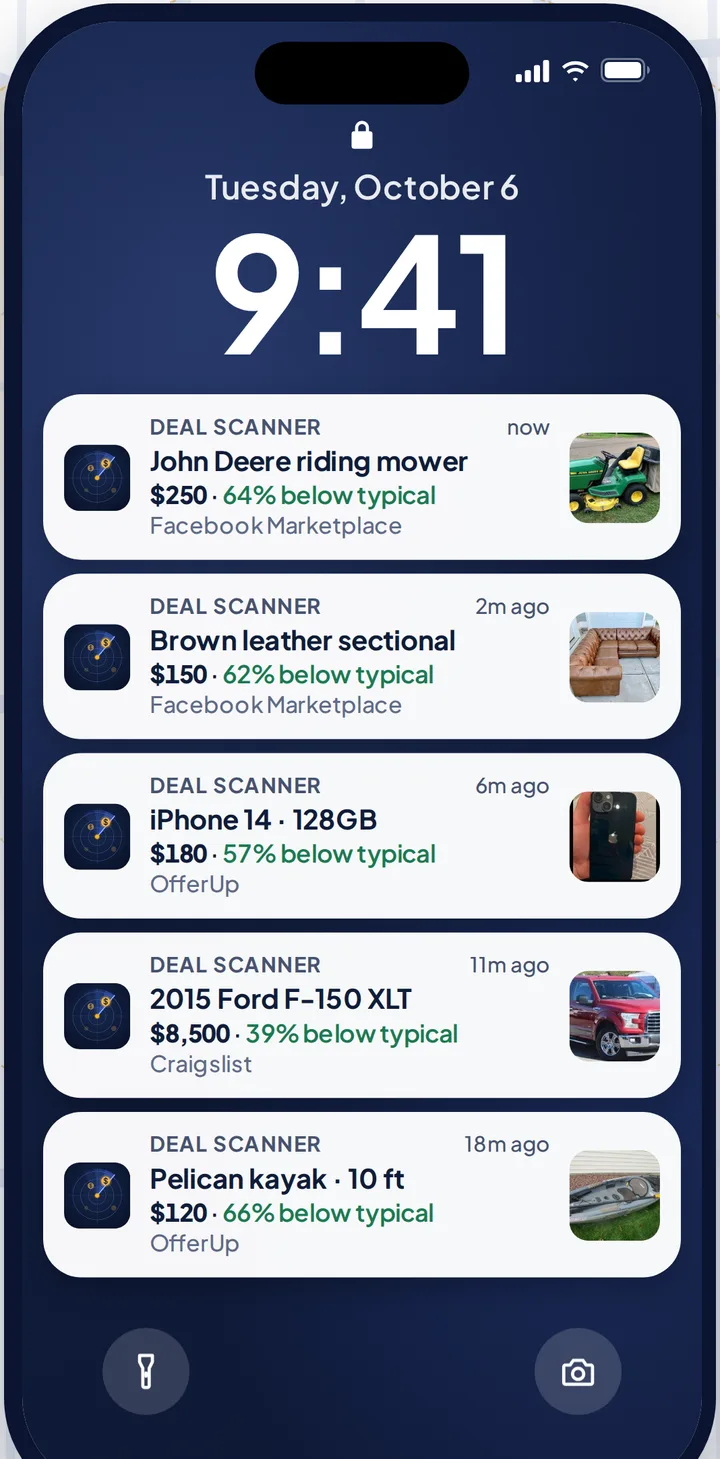
Three searches are $3.99 a month, cancel anytime in your phone's subscription settings. A lot of people need it for one thing at a time: the kid's first car, a four-wheeler, a snowblower before the first storm. Pay for the month you're looking. Cancel when you've got it. If you check Marketplace every day, whether flipping is your side thing, your whole job, or not the point at all, there are 6 searches for $9.99 and 12 for $19.99.
More on each marketplace: Facebook Marketplace alerts, OfferUp alerts, Craigslist alerts. The other alert apps, with each one's price checked on its own site, are on best Facebook Marketplace alert apps.
FAQ
Can Facebook Marketplace notify me when an item is listed?
Yes. Search for the item, set your filters, and tap Notify Me (or Save search) under the search bar. Then turn on Saved searches in Marketplace's notification settings. In our use the alerts arrive hours to days after the listing.
Why am I not getting notified of new Marketplace listings?
Usually one of three things: saved-search notifications are off inside Marketplace's settings, your phone is blocking or batching Facebook's notifications (Focus, Scheduled Summary, battery optimization), or the saved search turned itself off. Re-save the search and check each switch.
How do I get notified faster on Facebook Marketplace?
Facebook doesn't let you change how often a saved search is checked. Checking by hand sorted newest first is faster than the alert. An app that watches for you, like Deal Scanner, buzzes your phone when a matching listing is posted.
Can I get notified when something is listed on Facebook Marketplace without Facebook's notifications?
Yes. Deal Scanner watches Facebook Marketplace, OfferUp and Craigslist for your search and sends its own push alert. You don't need a Facebook login and you don't need Facebook's notifications turned on.
Can I get alerts for a specific item in my area?
Yes. Set the item, your location and a radius, and a price range. On Facebook that's a saved search. In Deal Scanner it's one search that covers all three marketplaces.
How much does it cost to get Marketplace alerts?
Facebook's saved-search alerts are free. Deal Scanner is $3.99 a month for three searches, cancel anytime in your phone's subscription settings.
Sources checked
HowToGeek's and Alphr's guides to setting up Facebook Marketplace alerts (Notify Me, Create Alert, the Saved searches notification category, by device); Outpost Alerts' guide to Marketplace notifications; our own setup guide and saved search troubleshooting for the notification switches. Checked October 31, 2026.
Also: Facebook Marketplace alerts OfferUp alerts Craigslist alerts Compare 14 alert apps Alert app for iPhone and Android Free alert options Marketplace scanner Marketplace monitor One app for all three Notifications not working? Set up Facebook's own alerts Swoopa alternatives Swoopa pricing Flipify alternatives DealScout alternatives