 Deal Scanner
OfferUp
OfferUp notifications about a previous search
Why OfferUp keeps sending notifications about something you searched weeks ago, and how to stop them: delete old search alerts, remove similar item alerts, turn off recommendation pushes and emails, without losing your message notifications.
OfferUp keeps buzzing you about something you searched weeks ago for one of three reasons: a search alert you set is still on, a similar item alert from a listing you looked at is still on, or OfferUp is sending personalized recommendations based on what you searched. To stop them, delete the old alert under Account → Search Alerts, remove any similar item alert from the listing you set it on, and turn off the push and email toggles you don't want under Account → Account Settings → Manage Notifications. Your message notifications stay on if you only switch off the others. The steps are below, plus how to get alerts that only fire for the thing you still want.
Why OfferUp is still talking about that search
OfferUp's help pages describe three kinds of notification that can feel like "about a previous search":
- Search alerts. Set with the bell on a search results page. They keep going until you delete them. Bought the PS5 in September? The PS5 alert is still on in November.
- Similar item alerts. Set with Set Alert under "Get Notified About Similar Items" on one listing. Easy to tap without meaning to, and they also keep going.
- Personalized recommendations. OfferUp says it sends push notifications and emails "to tell you about personalized recommendations." What you searched is the obvious thing it uses to pick them. You never set these. They come anyway.
There's a fourth kind of noise inside a real alert. OfferUp's help page says a search alert for "iPhone 15" sends "other iPhone models, and items related to iPhones like phone cases or screen protectors" too. So even an alert you want sends things that look unrelated to what you searched.
Step 1: delete old search alerts
From OfferUp's help page:
- Open the OfferUp app and log in.
- On the Home page, tap your profile picture in the top right.
- On the Account page, tap Search Alerts.
- Under Saved Search Alerts, tap Delete next to each term you're done with.
- Tap Delete again on the pop-up to confirm.
Delete everything you've already bought or stopped wanting. Keep the ones you still care about.
Step 2: remove similar item alerts
These don't sit in the Search Alerts list the same way, so they're the ones people miss.
- From the listing: open the listing where you set it, scroll to "You'll be notified about similar items," and tap Remove Alert.
- From the notification: next time one comes in, tap it to open the feed, then tap the Bell at the top to turn it off.
Step 3: turn off recommendation pushes and emails
This is the switch for the notifications you never asked for. From OfferUp's help page:
- Tap Account → Account Settings.
- Scroll down to Notifications and tap Manage Notifications.
- Tap Edit next to a notification type you don't want.
- Turn off Push Notification to stop it buzzing your phone, and Email to stop it in your inbox.
Changes take effect immediately, OfferUp says. Go through the list and leave messages on so you still hear from buyers and sellers. Turn off the recommendation and promotion types.
For marketing emails, OfferUp also puts Unsubscribe From Marketing Emails at the bottom of each one. It says that's usually immediate, and can take up to 10 business days.
What you can't turn off
- In-app notifications. OfferUp's help page: "In-app notifications are mandatory and cannot be disabled." They sit in Inbox → Notifications. You can delete them; you can't stop them.
- Recent searches under the search bar. OfferUp shows your recent searches when you tap the search bar. Its help pages don't document a way to clear them, and they're not notifications; they don't buzz.
The nuclear option: turn OfferUp off at the phone
If you want silence: iPhone: Settings → Apps → OfferUp → Notifications → Allow Notifications off. Android: Settings → Apps → OfferUp → Notifications off. OfferUp says it then can't send any push notifications except verification codes and one-time passwords. The catch: you also lose messages from buyers and sellers, so you'll need to open the app to check. Most people are better off with Step 3.
Search alerts that should be buzzing and aren't is a different problem: OfferUp notifications not working.
How I learned this
I was looking for a cheap car to save on gas and keep miles off my truck. Something that ran and didn't need a new engine or a timing belt. Every time I found one and messaged the seller: sorry, already sold, or there's ten guys ahead of you. And the listing was posted yesterday, or two days ago. You can't sit there refreshing Marketplace every five minutes. You have to see the deal for it to happen.
Alerts that only buzz for what you still want
The real fix for noise is an alert that's tight to begin with and ends when you're done.
| OfferUp search alert | Deal Scanner | |
|---|---|---|
| What it sends | The item "plus" related models and accessories (OfferUp's words) | The item; drops most accessories and lookalikes |
| Low price limit | No | Yes, so the $8 case doesn't come with the $600 phone |
| Marketplaces | OfferUp | OfferUp, Facebook Marketplace, Craigslist |
| Turning it off | Delete each alert | Delete the search, or cancel |
| Cost | Free | $3.99 a month, cancel anytime |
Deal Scanner watches OfferUp, Facebook Marketplace and Craigslist for a search you set: the item, your town, how far you'd drive, and a low and high price. It runs on our servers around the clock with the app closed, drops most accessories and lookalikes, and buzzes your phone when a matching listing is posted. Each alert shows when it found the listing and a Deal Score for how far under the typical price near you it sits. If a listing drops in price, you get a "was $X, now $Y" alert. Quiet hours and a daily digest are in Settings if you want fewer buzzes. It never asks for your OfferUp login.
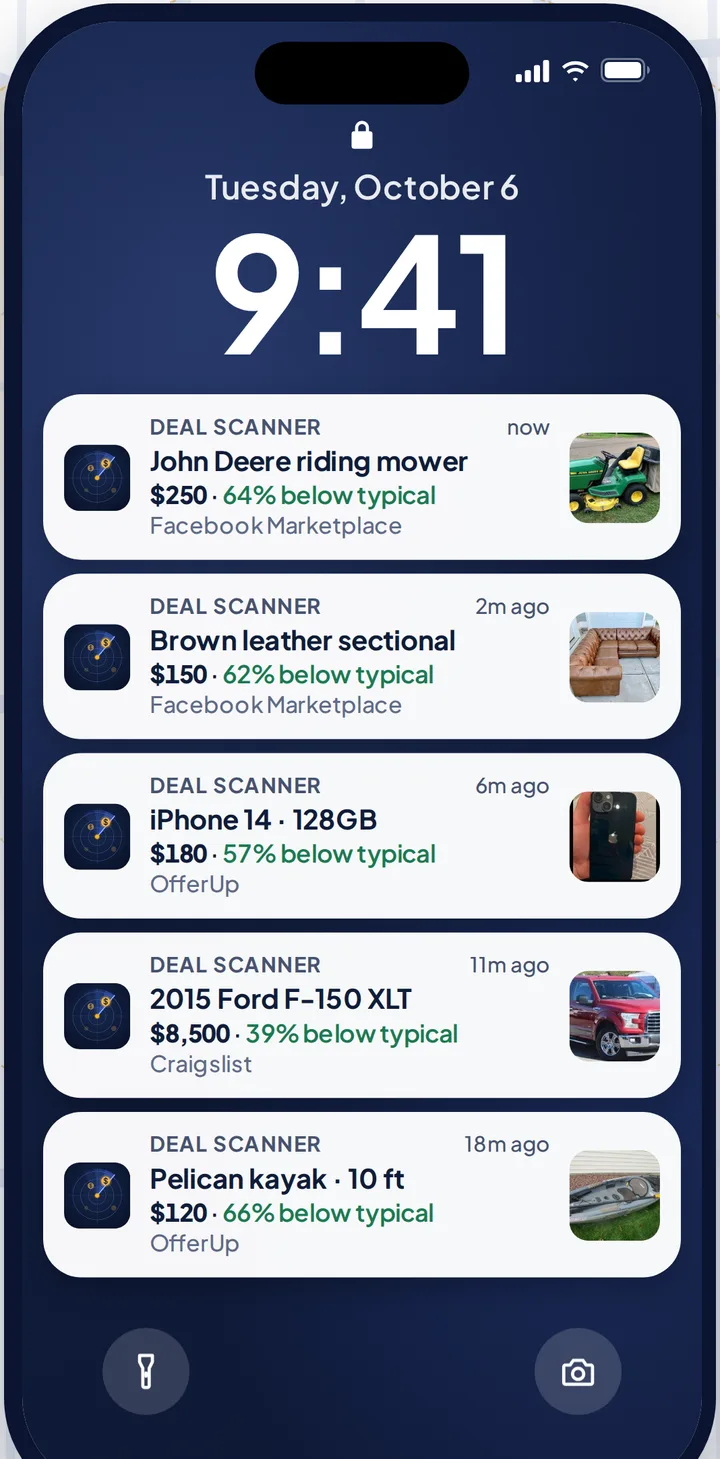
And when you've got it, you're done. Three searches are $3.99 a month, cancel anytime in your phone's subscription settings. Bought the snowblower? Delete the search, or cancel. Pay for the month you're looking. Cancel when you've got it. If you check the listings every day, whether flipping is your side thing, your whole job, or not the point at all, there are 6 searches for $9.99 and 12 for $19.99.
More on the OfferUp side: OfferUp alerts and how to set up OfferUp alerts. The other two marketplaces: Facebook Marketplace alerts and Craigslist alerts. Every alert app compared, prices checked on their own sites: best OfferUp alert apps.
FAQ
Why does OfferUp keep sending me notifications about something I searched?
An old search alert or similar item alert is still on, or OfferUp is sending personalized recommendations. Delete old alerts under Account → Search Alerts, remove similar item alerts from the listing, and turn off the recommendation types under Account → Account Settings → Manage Notifications.
How do I delete a search alert on OfferUp?
Tap your profile picture, then Search Alerts. Under Saved Search Alerts, tap Delete next to the term, then Delete again to confirm.
How do I stop OfferUp recommendation notifications but keep messages?
Go to Account → Account Settings → Manage Notifications, tap Edit next to each notification type, and turn off Push and Email for the ones you don't want. Leave messages on.
Can I turn off OfferUp in-app notifications?
No. OfferUp says in-app notifications are mandatory. You can delete them from Inbox → Notifications, but not stop them.
Why does my OfferUp alert send phone cases when I searched for a phone?
That's how OfferUp search alerts work: by OfferUp's own description they include other models and related items like cases and screen protectors, and there's no low price limit. Deal Scanner's relevance filter and price range keep most of that out.
How do I stop OfferUp emails?
Tap Unsubscribe From Marketing Emails at the bottom of one, or turn off the Email toggle for each type under Manage Notifications. OfferUp says unsubscribing can take up to 10 business days.
Sources checked
OfferUp Support: "Get notified about items you want," "Manage notification preferences," "About notifications" and "Search for items to buy"; OfferUp Community posts on stopping notifications; Botifex's and Marketplace Monitor's OfferUp notification guides; our own OfferUp notifications not working page. Checked November 3, 2026.
Also: Facebook Marketplace alerts OfferUp alerts Craigslist alerts Compare 14 alert apps Alert app for iPhone and Android Free alert options Marketplace scanner Marketplace monitor One app for all three Notifications not working? Set up Facebook's own alerts Swoopa alternatives Swoopa pricing Flipify alternatives DealScout alternatives