 Deal Scanner
Facebook Marketplace
Facebook Marketplace double notifications?
Why Facebook Marketplace notifications show up twice: Facebook and Messenger both alerting for one message, push plus email or text copies, two devices or a watch, two overlapping saved searches, and relisted items. The fix for each, in order.
If every Facebook Marketplace notification shows up twice, it's almost always one of five things: the Facebook app and Messenger are both alerting you about the same Marketplace message, Facebook is sending a push and an email or text copy of the same alert, a second device or your watch is buzzing too, two of your saved searches match the same listing, or the seller relisted the item so it really is "new" again. Find which one it is with the quick test below, then fix just that one. None of them take more than a couple of minutes.
The quick test: what exactly is doubled?
Next time it happens, look at the two notifications side by side.
| What you see | What it is | Section |
|---|---|---|
| "Facebook" and "Messenger" both say a buyer or seller messaged you | Two apps, one message | 1 |
| One on your phone, one in your email or texts | Push plus a copy | 2 |
| Your phone and your watch, tablet or a second phone | Two devices | 3 |
| Two listing alerts, same item, slightly different wording | Overlapping saved searches | 4 |
| Same item, a day or two apart | The seller relisted it | 5 |
| Two identical banners from the same app at the same second | An app glitch | 6 |
1. Facebook and Messenger both alerting
Marketplace chats are Messenger chats. So when someone messages you about your PS5 listing, the Messenger app tells you, and the Facebook app can tell you too ("so-and-so messaged you about..."). Two buzzes, one message. This is the most common double by a mile, and Apple's community forum has threads from iPhone owners getting exactly this pair.
Pick the app you want to hear from and quiet the other one for messages:
- Keep Messenger, quiet Facebook: in the Facebook app, Menu → Settings & privacy → Settings → Notifications, open Marketplace, and turn off push for the message and chat categories. Leave the categories you still want (saved searches, your listings) on.
- Keep Facebook, quiet Messenger: on iPhone, Settings → Apps → Messenger → Notifications. On Android, long-press the Messenger icon → App info → Notifications. Turn it off or set it to silent.
If you still get pairs after that, delete Messenger and reinstall it. That's what fixed it for some people in the Apple thread. It didn't fix it for everyone, which is why the settings change comes first.
2. Push plus email or text copies
Facebook can send a Marketplace notification three ways: push, email and SMS. Each category has its own switches, so it's easy to end up with a buzz on your phone and the same thing in your inbox a minute later.
- Menu → Settings & privacy → Settings → Notifications.
- Open Marketplace, then each category inside it.
- Leave Push on. Turn Email and SMS off.
Or tap unsubscribe at the bottom of a Marketplace email. More on stopping the noisy categories entirely on Marketplace notifications won't go away.
3. A second device or your watch
Facebook sends push notifications to every phone and tablet you're logged into. An old phone in a drawer, a tablet on the counter, the kid's iPad you signed into once. They all buzz.
- See where you're logged in: Settings & privacy → Settings → Accounts Center → Password and security → Where you're logged in. Log out of anything you don't use.
- Apple Watch: a watch mirrors your iPhone's notifications, so the watch and phone both going off is normal. In the Watch app on your iPhone, Notifications → Facebook, pick Mirror my iPhone, a custom setting, or turn it off.
- Wear OS and Galaxy watches: in the Galaxy Wearable or Pixel Watch app, open notifications and turn Facebook off there.
- Two Facebook accounts in the same app on one phone (a personal and a page or business account) can each send their own copy. Switch to the other account and turn its Marketplace notifications down.
4. Two saved searches that match the same thing
Saved "PS5" and "PlayStation 5"? A Sony PS5 listing matches both, so you get two alerts for one console. Same with "F-150" and "F150", or "riding mower" and "John Deere".
Open Marketplace → your profile icon → Saved searches (or the bell next to a search), and look for overlaps. Keep the one that finds what you want and delete the other. If you're not sure how, here's how to delete a saved search and how to edit one.
The opposite also happens: Facebook sometimes bundles several new listings into one notification, then sends another one later that includes some of the same listings. That can look like a double. It's Facebook's batching, and there's no switch for it.
5. The seller relisted or reposted it
Sellers renew listings to push them back to the top, delete and repost when nothing sells, or post the same thing again in a buy-and-sell group. To your saved search, that's a new listing, and Facebook alerts you again. If the second alert came a day or two after the first, check the listing: same photos, same seller, maybe a lower price. That's not a bug. It's sometimes the best alert you get, because a relist often means it hasn't sold and the seller is getting ready to move.
6. Two identical banners from the same app
Two banners from the same app at the same second, every time, for everything: that's the app, not your settings.
- Update Facebook (and Messenger) from the App Store or Google Play.
- Log out of Facebook and log back in. This re-registers the phone for push.
- Still doubled: delete the app, restart the phone, reinstall.
- Android: check you don't have both Facebook and Facebook Lite installed. Both will notify you. Keep one.
When the double is the least of it
Here's the thing nobody says out loud. Two notifications for a listing is annoying, but if both of them showed up after the listing sold, you got told twice about something you missed. Facebook's saved-search alerts are hours to days late, loosely filtered, and they turn themselves off. Getting the count down to one doesn't fix any of that.
How I learned this
Facebook's notifications don't work. It's hours late. It turns itself off and you have to go check it's still on. I was looking for a cheap car that ran, and every time I messaged a seller it was sorry, already sold, or there's ten guys ahead of you. The listing was posted yesterday, or two days ago. You can't sit there refreshing Marketplace every five minutes. You have to see the deal for it to happen.
One alert per find, on your phone
Deal Scanner watches Facebook Marketplace, OfferUp and Craigslist for a search you set, from our own servers, around the clock, with the app closed. You type the item, your town, how far you'd drive, and a low and high price. It drops most of the accessories and lookalikes and buzzes your phone when a matching listing is posted. Every alert shows when we found the listing and a Deal Score for how far under the typical price near you it sits. If a listing you were alerted about drops at least 5% in price, you get a "was $X, now $Y" alert; tiny drops ($505 to $500) don't buzz. Quiet hours and a daily digest keep it from waking you up. No Facebook login, no Messenger, no email copies.
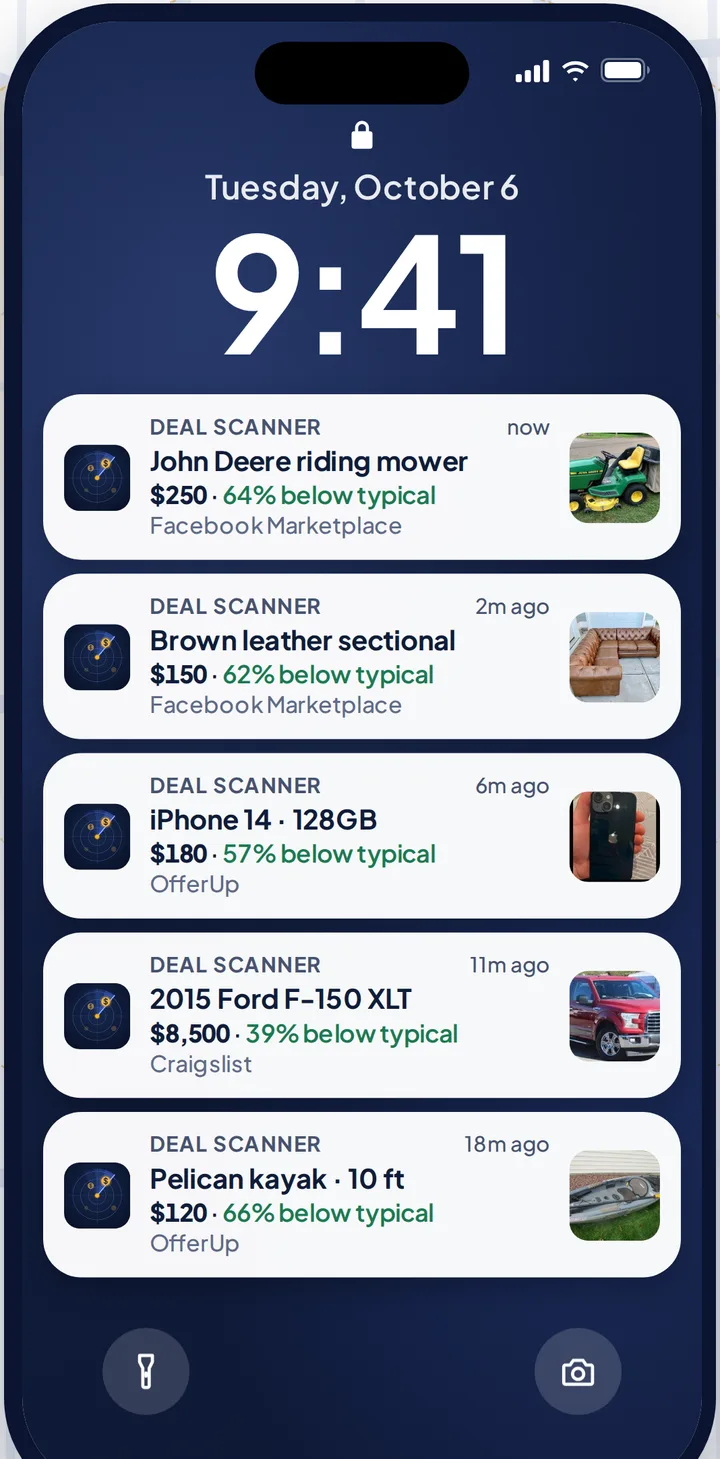
Three searches are $3.99 a month, cancel anytime in your phone's subscription settings. Most people need it for one thing: a snowblower before the first storm, a four-wheeler, the kid's first car. Pay for the month you're looking. Cancel when you've got it. If you check Marketplace every day, whether flipping is your side thing, your whole job, or not the point at all, there are 6 searches for $9.99 and 12 for $19.99.
How it works on Facebook: Facebook Marketplace alerts. The same for the other two: Craigslist alerts and OfferUp alerts. Every alert app compared, prices checked on their own sites: best Facebook Marketplace alert apps. And if your problem is the opposite, no notifications at all: Facebook Marketplace notifications not working.
FAQ
Why do I get two notifications for every Facebook Marketplace message?
Marketplace chats run through Messenger, so the Messenger app and the Facebook app can both alert you about the same message. Turn off message notifications in one of the two. If it keeps happening, reinstall Messenger.
Why do I get the same Marketplace alert on my phone and in my email?
Facebook sends Marketplace notifications by push, email and SMS, with separate switches for each category. In Settings → Notifications → Marketplace, leave Push on and turn Email and SMS off.
Why does my Apple Watch buzz at the same time as my phone for Facebook?
The watch mirrors the iPhone's notifications by default. In the Watch app on your iPhone, go to Notifications → Facebook and turn it off or set a custom setting.
Why did I get two alerts for the same listing a day apart?
Usually the seller renewed or reposted it, so your saved search sees it as new. It can also be two saved searches that both match it, like "PS5" and "PlayStation 5". Delete the overlap.
How do I stop duplicate Facebook notifications on Android?
Check that only one of Facebook and Facebook Lite is installed, turn off message notifications in either Facebook or Messenger, and turn off email and SMS copies in Facebook's Marketplace notification settings. Then update the app and log out and back in.
Sources checked
Apple Community thread "iPhone double notification for Facebook messenger"; Gadget Hacks, "How to Stop Facebook's Annoying Marketplace Notifications"; Flipify's and Outpost Alerts' Marketplace notification troubleshooting guides; our own Marketplace notifications won't go away and notifications not working on iPhone pages. Menu names can move between app versions. Checked November 5, 2026.
Also: Facebook Marketplace alerts OfferUp alerts Craigslist alerts Compare 14 alert apps Alert app for iPhone and Android Free alert options Marketplace scanner Marketplace monitor One app for all three Notifications not working? Set up Facebook's own alerts Swoopa alternatives Swoopa pricing Flipify alternatives DealScout alternatives