 Deal Scanner
Facebook Marketplace
How to edit a saved search on Facebook Marketplace
Facebook Marketplace has no edit button for a saved search. How to change the keywords, price, distance or location anyway, in the app and on a computer, without getting two alerts for every listing.
You can't edit a saved search on Facebook Marketplace in place. There's no edit button, and Facebook's help pages don't describe one. To change one, you replace it: run the search the way you want it now (new words, price range, distance or location), tap the bell or Notify me to save the new version, then go back to the old search and turn its bell off. Two minutes, and the order matters: save the new one first, delete the old one second, or you'll go a stretch with nothing watching. Here's how to do it in the app and on a computer, and what's worth changing.
Change a saved search in the Facebook app (iPhone and Android)
- Open Facebook → Marketplace (Menu → Marketplace, or See more if it's hidden).
- Tap the search bar and type the search the way you want it now. Say you had "snowblower" and you want "Toro snowblower."
- Set the filters before you save, because the saved search keeps them: tap your location to change the town and distance, then Filters for price (min and max), condition and sort.
- On the results page, tap the bell or Notify me next to the search bar. That's the new saved search.
- Now the old one. Tap the search bar again, find the old search in the list (or type its exact words), run it, and tap the bell off. Some app versions show an X or three-dot menu next to it under the search bar; use that if you see it.
Full steps for getting rid of the old one, including one that won't go: how to delete a saved search on Facebook Marketplace.
Change a saved search on a computer
- facebook.com → Marketplace in the left column.
- Type the new search. In the left panel, set the location and radius, and the price, condition and other filters.
- Click Notify Me under the search bar to save it.
- Run the old search (same words, same location) and turn its Notify Me off.
The computer shows the filters all in one panel, so it's the easier place to get a search exactly right. The saved search is the same one your phone notifies you about.
What to change, and what each change does
| Change | Do it when | Watch out for |
|---|---|---|
| Keywords | The search buzzes for the wrong things ("mower" sends you mower blades) | Name the item: "John Deere riding mower," not "mower." Too specific ("John Deere E130 48 inch") and you'll miss the listing that says "JD lawn tractor" |
| Min price | Accessories, parts and scams under $50 keep showing up | In our use the notifications still let accessories through; Facebook's alerts have no low price limit of their own |
| Max price | Things you'd never pay for keep coming | Leave a little room. A $700 Honda generator gets listed at $750 and taken down to $650 |
| Distance | Nothing's coming, or everything's two hours away | 10 to 25 miles for everyday stuff. Wider for a truck or a boat you'd drive for |
| Location | You moved, or you want a bigger town's listings | One location per search. Two areas means two searches |
Change one thing at a time. If you widen the radius and add a word in the same edit and the alerts go quiet, you won't know which one did it.
Why there's no edit button
Facebook doesn't say. The saved search is really just the search plus a bell, so the "edit" is a new search with a new bell. What it means for you: every change is a new saved search, and every old one you forget to turn off keeps buzzing. That's where double notifications for the same listing come from, and it's why people end up with fifty saved searches and no idea which ones are on.
The settings that aren't part of the saved search
Some things people try to "edit" aren't inside the saved search at all. They're Facebook-wide:
- Whether saved searches notify you at all: Marketplace → your Marketplace profile → Settings → Notifications → Saved searches.
- Push on or off for Marketplace: Menu → Settings & privacy → Settings → Notifications → Marketplace.
- How often it checks, or how fast it tells you: not a setting. Facebook doesn't let you pick, and doesn't say.
If the edited search goes quiet, it's usually one of the first two, or the phone's own notification permission for Facebook. Saved search notifications not working walks through every switch.
What an edited saved search still won't do
You can tune the words and the filters all day. What you can't change is how Facebook sends the notification. In our use: hours to days late, loosely filtered (lookalikes and accessories come with the real thing), no low price limit on the buzz, and saved searches turn themselves off without telling you. It's Facebook only, so the same Toro snowblower on OfferUp or Craigslist never shows up. And Meta AI's shopping mode and the Muse agent don't fill the gap. They're a chat, not a watch. You have to ask every time.
How I learned this
I was looking for a cheap car to save on gas and keep miles off my truck. Something that ran and didn't need a new engine or a timing belt. I changed that saved search more times than I can count. Different price, wider radius, different words. Didn't matter. Every time I found one and messaged the seller: sorry, already sold, or there's ten guys ahead of you. The listing was posted yesterday, or two days ago. You have to see the deal for it to happen.
A search you can set right the first time
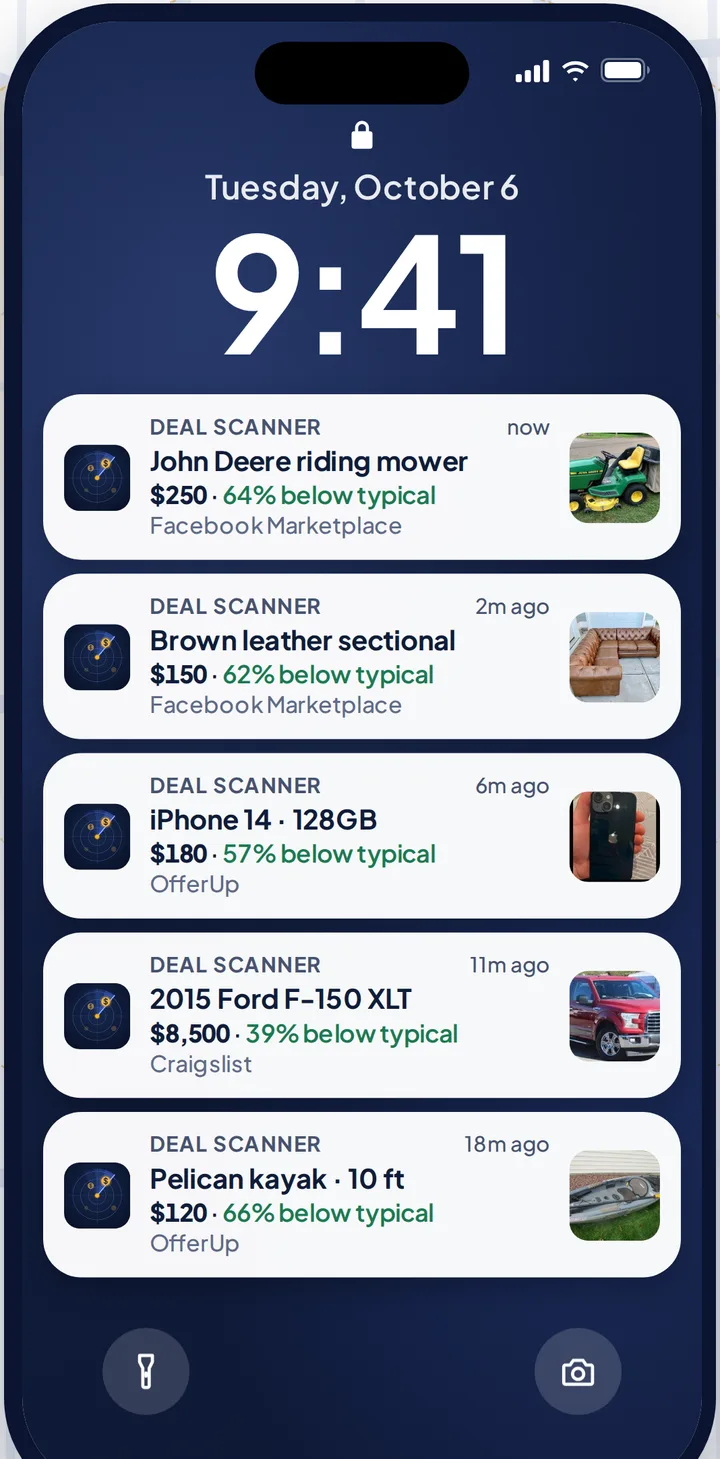
Deal Scanner is a phone app that watches Facebook Marketplace, OfferUp and Craigslist for a search you set: the item, your town, how far you'd drive, and a low and high price. The low limit actually works on the buzz, so the $8 phone case doesn't come with the $600 phone. It runs on our servers around the clock with the app closed, drops most accessories and lookalikes, and buzzes your phone when a matching listing is posted. Every alert shows when we found the listing and a Deal Score for how far under the typical price near you it sits. If a listing over your high limit drops into your range, you hear about it as a new find. It never asks for your Facebook login.
| Facebook saved search | Deal Scanner search | |
|---|---|---|
| Changing it | Save a new search, delete the old one | Delete or pause it on the Searches tab, set the new one on the new-search screen |
| Low price limit on the alert | No | Yes |
| Accessories and lookalikes | Come with the real thing | Mostly dropped |
| Marketplaces | Facebook Marketplace, OfferUp, Craigslist | |
| Turns itself off | Yes, in our use | No, runs until you pause or delete it |
| Cost | Free | $3.99 a month, cancel anytime |
Three searches are $3.99 a month, cancel anytime in your phone's subscription settings. Pay for the month you're looking. Cancel when you've got it. If you check Marketplace every day, whether flipping is your side thing, your whole job, or not the point at all, there are 6 searches for $9.99 and 12 for $19.99, and yearly gives you two months free.
More: Facebook Marketplace alerts, Facebook Marketplace saved searches and how to get notified when something is listed. The other two marketplaces: Craigslist alerts and OfferUp alerts. Every alert app compared, prices checked on their own sites: best Facebook Marketplace alert apps.
FAQ
Can you edit a saved search on Facebook Marketplace?
Not in place. There's no edit button. Run the search the way you want it, save it with the bell or Notify me, then turn the old search's bell off.
How do I change the price range on a saved search?
Run the search, tap Filters, set the new min and max price, and save it with the bell. Then delete the old saved search so you don't get two alerts for every listing.
How do I change the location or distance of a saved search?
Run the search, tap your location on the results page, pick the town and radius, and save it with the bell. Delete the old one after.
Why am I getting two notifications for the same listing?
You probably have two saved searches that both match it, often an old version you meant to replace. Find the old one under the Marketplace search bar and turn its bell off.
Does editing a saved search make the notifications faster?
No. Facebook doesn't let you set how often it checks or how fast it notifies you. In our use the notification arrives hours to days after the listing was posted.
How many saved searches can I have on Facebook Marketplace?
Facebook doesn't publish a limit. The more you have, the harder it gets to tell which ones are still on, so delete the ones you're done with.
Sources checked
Facebook Help Center: "Turn your Facebook Marketplace notifications on or off" and "Turn your Marketplace notifications on or off"; Zoopy's Facebook Marketplace saved searches guide; How-To Geek's Facebook Marketplace alerts walkthrough; the Marketplace app and website; our own Facebook Marketplace saved searches guide. Checked November 4, 2026. Facebook changes these labels between versions; email us if yours differ.
Also: Facebook Marketplace alerts OfferUp alerts Craigslist alerts Compare 14 alert apps Alert app for iPhone and Android Free alert options Marketplace scanner Marketplace monitor One app for all three Notifications not working? Set up Facebook's own alerts Swoopa alternatives Swoopa pricing Flipify alternatives DealScout alternatives